One GraphQL Endpoint, Many Schemas: Changing a Schema Under Shipped Mobile Apps
The usual GraphQL advice on versioning is to not do it. Add fields, deprecate the old ones, never remove anything, and let clients move over at their own pace. That works as long as you are willing to keep every shape you have ever shipped. It works less well when you want to change a mutation's return type or switch your IDs to a different format, and some of your clients are binaries sitting in the App Store and Play Store.
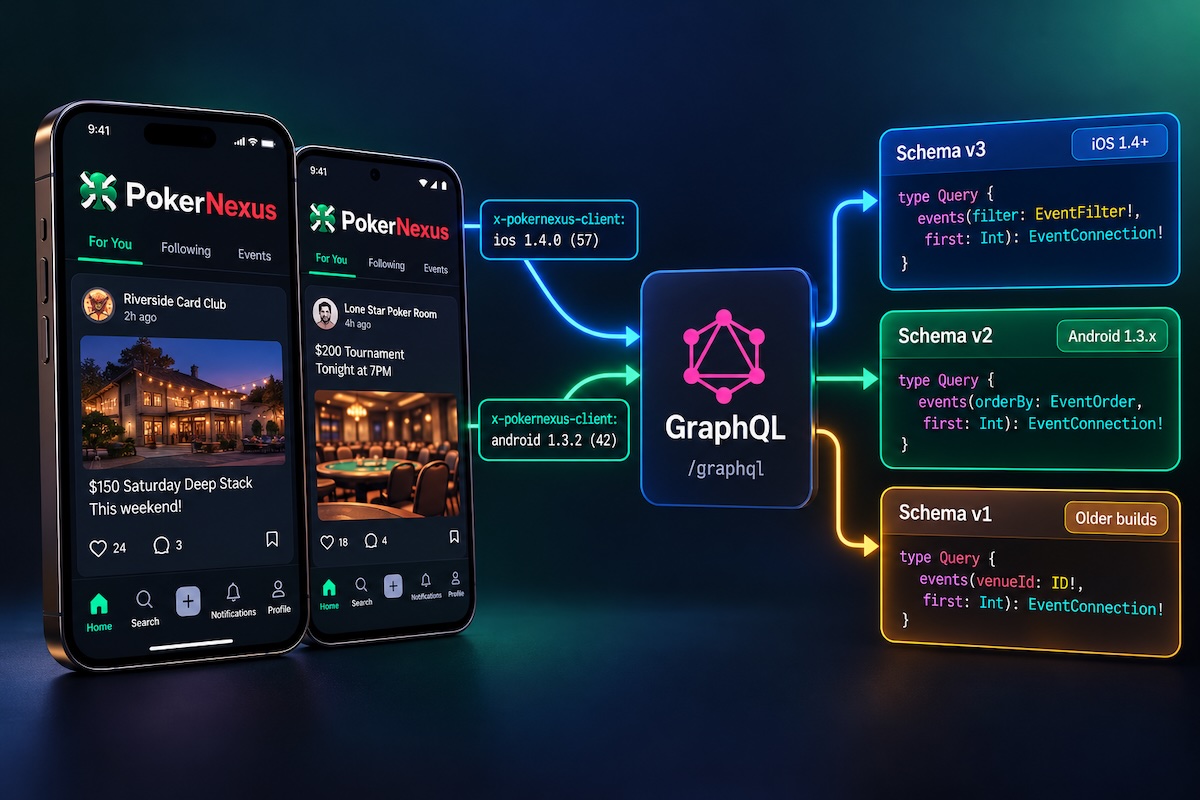
This post walks through how I handled exactly that in PokerNexus, a social network for poker players with a web app and iOS and Android apps built on Capacitor. The short version: the server builds one schema per client release cutover, picks one per request from a header the app sends, and CI replays every shipped build's queries against the schema that build is served.
The problem: a native build can't be rolled back
On the web, a schema change and the client code that uses it ship in the same deploy. Nobody runs last week's website.
A store build is different. Once someone installs build 31, build 31 is what sends requests until they update, and plenty of people don't update for weeks. Whatever queries were compiled into that binary are the queries your server will receive.
GraphQL makes this stricter than REST. The server validates the entire document before running any of it, so one unknown field or argument fails the whole request:
graphql# Build 31 was compiled with this:
query Events($venueId: ID!) {
  events(venueId: $venueId, first: 20) { edges { node { id name } } }
}
graphql# ...and the server now has this:
type Query {
  events(filter: EventFilter!, first: Int): EventConnection!
}

input EventFilter {
  venueId: ID
}
json{ "errors": [{ "message": "Unknown argument \"venueId\" on field \"Query.events\"." }] }
The screen doesn't degrade gracefully. It just shows an error.
I had a list of changes I wanted to make that couldn't be done additively:
- Create, update, and delete mutations returning a payload type (
CreatePostResult) instead of the bare entity. - Every ID crossing the wire as a Relay global ID instead of a raw UUID.
- Lists ordered by a single
orderBy:enum, replacing a mix oforder:andsort:. - A list's parent moving into its
filter:input instead of a separate argument.
Try additive first
Some changes only look breaking, and those should stay additive:
- An argument moving into an input can keep the old argument as an optional,
@deprecatedone beside the new input. - An input field becoming optional needs nothing at all.
- An argument that starts accepting a new format can accept both formats. That one comes back later, because it's only safe for some callers.
Everything else needed the old shape served to old builds, and only to them.
Step 1: tell the server which build is calling
Every request from the native app carries a header naming the platform, version, and build number:
x-pokernexus-client: ios 1.4.0 (57)
The format and parse functions live in a shared package that both the app and the server import, so the two sides can't disagree on the spelling. The parse never trusts what it receives. It rebuilds the value from parts that match a strict shape, and anything that doesn't parse is treated as the web:
tsexport const CLIENT_RELEASE_HEADER = "x-pokernexus-client";

export function formatClientRelease({ platform, version, build }: Release): string {
  return `${platform} ${version} (${build})`;
}

export function parseClientRelease(value: string | null): ClientRelease {
  const [platformToken = "", ...rest] = (value ?? "").trim().split(" ");
  const platform = shellSchema.safeParse(platformToken); // "ios" | "android"
  if (!platform.success) {
    return { platform: "WEB", appVersion: null };
  }
  const match = /^(\S+) \((\S+)\)$/.exec(rest.join(" "));
  const version = versionSchema.safeParse(match?.[1]); // 1.4.0
  const build = buildSchema.safeParse(match?.[2]); // 57
  if (!version.success || !build.success) {
    return { platform: platform.data, appVersion: null };
  }
  return { platform: platform.data, appVersion: `${version.data} (${build.data})` };
}
On the app side, a fetch wrapper adds the header. Reading the build number is an async native call, so it's cached, and every request waits a bounded amount of time for it:
tslet release: Promise<string | null> | null = null;

export function clientReleaseHeader(): Promise<string | null> {
  release ??= App.getInfo().then(
    (info) => formatClientRelease({ platform, version: info.version, build: info.build }),
    () => null,
  );
  return Promise.race([release, timeout(1_000)]);
}
There's a trap here, and my first version fell into it. The cache has to hold the lookup, not the outcome of the race. If the first request times out and you cache that null, every request for the rest of the process goes without the header. As you'll see next, a native app without the header is served the oldest schema. A brand-new build would quietly talk to the server as if it were months old.
The header also has to be in your CORS allowHeaders. Capacitor's webview is a different origin from your API, and a header the preflight doesn't allow never reaches the server.
Builds from before the header
Builds released before I added the header still had to be identified, because they were exactly the builds the legacy shapes were for. A request from a Capacitor webview origin (capacitor://localhost on iOS, https://localhost on Android) with no usable header can only be one of two things: a build from before the header, or a lookup that timed out. Both get the oldest schema:
tsconst NATIVE_WEBVIEW_ORIGINS = ["capacitor://localhost", "https://localhost"];

/** `null` is anything but a store build: the website, internal services. */
export function shippedBuildOf(headers: Headers): number | null {
  const release = parseClientRelease(headers.get(CLIENT_RELEASE_HEADER));
  if (release.platform === "WEB") {
    return NATIVE_WEBVIEW_ORIGINS.includes(headers.get("origin") ?? "") ? 0 : null;
  }
  const build = /\((\d+)\)$/.exec(release.appVersion ?? "")?.[1];
  return build === undefined ? 0 : Number(build);
}
The asymmetry matters. A store build I can't place gets build 0 and the oldest schema. Anything else gets null and the current one.
Step 2: make schema a function
This is the part that's easiest to miss in the docs: createYoga accepts a function for schema, called with the request context, as well as a schema object.
tsconst releaseSchemas = createReleaseSchemas(builder.toSchema(), legacyShapes);

export function createGraphQL() {
  return createYoga({
    schema: ({ request }) => releaseSchemas.forBuild(shippedBuildOf(request.headers)),
    context: (initial) => createContext(initial),
    // ...
  });
}
The shippedBuild value returned by shippedBuildOf also goes on the GraphQL context, which becomes useful later.
One rule matters a lot here: build the schemas once, at startup, never per request. Yoga caches document validation per schema object. Return a fresh GraphQLSchema on every request and you throw that cache away, so every operation gets re-validated every time. forBuild therefore only picks from a small, fixed set:
tsexport function createReleaseSchemas(base: GraphQLSchema, legacy: LegacyShapes) {
  const current = withShapes(base, legacy, () => false);
  const cutovers = [...new Set([...legacy.values()].map((shape) => shape.until))].sort(
    (a, b) => a - b,
  );
  const byCutover = cutovers.map((cutover) => ({
    cutover,
    schema: withShapes(base, legacy, (shape) => shape.until >= cutover),
  }));

  return {
    current,
    forBuild: (build: number | null) =>
      build === null
        ? current
        : (byCutover.find(({ cutover }) => build < cutover)?.schema ?? current),
  };
}
A cutover is "the first build whose documents use the new shape". I batched my whole migration into a single cutover, build 32, so in practice there are two schemas: before 32, and current. The code doesn't assume that, though. If two generations of the same field exist, a build gets the oldest one that still applies to it.
Step 3: register legacy shapes next to the current ones
I build the schema with Pothos, but the idea works with any code-first or schema-first setup. The current field is defined as normal. The old one is defined beside it under a suffixed name, and recorded in a registry:
tsexport const legacyShapes = new Map<string, LegacyShape>();

type MutationField = Parameters<typeof builder.mutationField>[1];

export function legacyMutationField({ name, until, field }: {
  /** The mutation's name as old builds call it, e.g. `"createPost"`. */
  name: string;
  /**
   * The cutover build: the first build whose documents use the current shape.
   * Builds below it are served this legacy shape; it and later builds get the current one.
   */
  until: number;
  /** The mutation as old builds expect it, defined the same way as any Pothos mutation field. */
  field: MutationField;
}) {
  const registeredAs = `${name}Before${until}`;
  legacyShapes.set(registeredAs, { kind: "field", rootType: "Mutation", name, until });
  builder.mutationField(registeredAs, field);
}
So createPost now returns a result type, and the old version still returns the bare Post, served only to builds below 32:
tsbuilder.mutationField("createPost", (t) =>
  t.field({
    type: CreatePostResult,
    args: { input: t.arg({ type: CreatePostInput, required: true }) },
    resolve: (_root, args, context) => writePost(context, args.input),
  }),
);

legacyMutationField({
  name: "createPost",
  until: CRUD_RESULTS_BUILD,
  field: (t) => t.prismaField({
    type: "Post",
    args: { input: t.arg({ type: CreatePostInput, required: true }) },
    resolve: async (query, _root, args, context) => {
      const { post } = await writePost(context, args.input);
      return context.prisma.post.findUniqueOrThrow({ ...query, where: { id: post.id } });
    },
  }),
});
Both call the same service function. The legacy field is only an adapter from the new behavior to the old response shape, so there's no second copy of business logic to drift.
The cutover builds are named constants, one per contract change, even though they all happen to be 32:
tsexport const CRUD_RESULTS_BUILD = 32;
export const GLOBAL_IDS_BUILD = 32;
export const ORDER_BY_BUILD = 32;
Once the first change was in, it turned out I needed more kinds of legacy shape than "an old root field":
| Kind | For |
|---|---|
field (root) | a query or mutation whose response type or arguments changed |
type | an input type an old document names in a variable, whose fields changed |
objectField | a field on an object type whose type stayed but whose value changed |
argument | an argument renamed while its type stayed (rowId → id) |
type is the subtle one. An old document doesn't just send fields; it declares its variables by type name (mutation ($input: UpdatePostInput!)). If UpdatePostInput gained a required field, that document now fails validation, even if every field it selects still exists. So the old input type is registered too, and the legacy mutation takes it.
Step 4: turn the registry into schemas
@graphql-tools/utils does the heavy lifting. mapSchema walks the schema and lets you rename or drop each field and type. pruneSchema then removes types nothing references anymore. Here it is for root fields; the other kinds follow the same pattern:
tsfunction withShapes(
  base: GraphQLSchema,
  legacy: LegacyShapes,
  applies: (shape: LegacyShape) => boolean,
): GraphQLSchema {
  const replaced = new Set(
    [...legacy.values()].filter(applies).map((shape) => `${shape.rootType}.${shape.name}`),
  );

  return pruneSchema(
    mapSchema(base, {
      [MapperKind.ROOT_FIELD]: (field, fieldName, typeName) => {
        const shape = legacy.get(fieldName);
        if (shape) {
          // createPostBefore32 → createPost for old builds; gone for new ones.
          return applies(shape) ? [shape.name, field] : null;
        }
        // The current createPost steps aside where its legacy copy applies.
        return replaced.has(`${typeName}.${fieldName}`) ? null : field;
      },
    }),
  );
}
Every legacy field disappears from the current schema. That schema is the one codegen prints, the website uses, and GraphiQL shows, so nobody new ever sees createPostBefore32. The pruneSchema call means a type that only a legacy field used also leaves the current schema.
Renamed arguments need the resolver to stay in on it
An argument rename is the one kind where serving the old name isn't enough. The resolver was written against the new name, so the wrapper has to rename the arguments back on their way in:
tsfunction withArgumentsRenamed(field: GraphQLFieldConfig, renames: Map<string, string>) {
  const currentOf = new Map([...renames].map(([current, served]) => [served, current]));
  const asWritten = (args: Record<string, unknown>) =>
    mapKeys(args, (name) => currentOf.get(name) ?? name);
  const resolve = field.resolve ?? defaultFieldResolver;

  return {
    ...field,
    args: mapKeys(field.args ?? {}, (name) => renames.get(name) ?? name),
    resolve: (source, args, context, info) => resolve(source, asWritten(args), context, info),
  };
}
If you use the Pothos Prisma plugin, there's a second reader: a relation field's arguments are also read when its parent builds the Prisma query, through a select builder stored in the field's extensions (pothosPrismaSelect). That function needs the same renaming, or the old argument name silently does nothing. I wrapped it the same way.
When the schema can't tell the difference
The move to global IDs had one case that no schema could express. An ID! argument is still an ID!. What changed is that its value used to be a raw UUID and is now an opaque global ID. Both are valid against both schemas, so the decision moves into the resolver, using the build number on the context:
tsexport function servedBefore(context: { shippedBuild: number | null }, until: number) {
  return context.shippedBuild !== null && context.shippedBuild < until;
}

/** The row an `ID` argument names, or null, which the caller answers as not found. */
export function rowIdOf(typename: string, id: string, context: Context): string | null {
  if (isUuid(id)) {
    return servedBefore(context, GLOBAL_IDS_BUILD) ? id : null;
  }
  return uuidOfGlobalId(typename, id);
}
A raw UUID is accepted only from builds that actually sent one. Everyone else, including the website, has to send a global ID.
Step 5: prove every shipped build still works
This is the part that made me trust the whole thing.
Every store release is a commit in git: the one that bumped the build number. And that commit holds the GraphQL documents codegen produced at the time, which are exactly what that binary sends. So CI can replay history:
tsconst releases = supportedReleases(); // commits that set versionCode >= OLDEST_SUPPORTED_BUILD

for (const { build, commit } of releases) {
  const documents = documentsOfGeneratedMap(git("show", `${commit}:packages/api/src/generated/gql.ts`));
  const errors = shippedDocumentErrors(releaseSchemas.forBuild(build), documents);
  console.log(`build ${build} (${commit.slice(0, 9)}): ${errors.length === 0 ? "ok" : "BROKEN"}`);
}
supportedReleases runs git log -G "versionCode [0-9]+" over the Android build.gradle and reads the build number at each commit. shippedDocumentErrors parses every operation, attaches the fragments it spreads, and runs graphql-js's own validate against the schema that build is served. It's the same check the server runs at request time, minus the network.
build 32 (5ac5dbc6b): ok
build 31 (a1e0c9d27): ok
build 30 (7f4b21e88): ok
...
Two practical notes. The check needs full git history, so the CI job does a non-shallow checkout; with a shallow clone it finds no releases and fails on purpose. And the first run found something I didn't know: builds 26 and earlier were already broken by changes made before any of this existed. That set my starting floor at build 27.
Step 6: retire legacy shapes when the data says so
Legacy shapes are temporary by design. The floor is a constant:
ts/**
 * The oldest store build whose documents the schema must still answer.
 * Raise it once the 30-day releases show no account below it.
 */
export const OLDEST_SUPPORTED_BUILD = 27;
I already record which release each account uses each day, from the same header, for an admin growth dashboard. Once no account has been seen on a build below a cutover in 30 days, the legacy shapes for that cutover are deleted and the floor goes up. Deleting them is easy: they're grouped by named cutover constant, and the CI check tells you if you got it wrong.
Gotchas
- Two copies of
graphql. In tests under Vite, my source resolved graphql-js's ESM build while Pothos got the CommonJS one. Each schema object was fine on its own, but schemas assembled from both failed graphql'sinstanceofchecks. The fix was resolvinggraphqlto a single entry in the test config, matching production. - Caching a timeout (above): a new build silently treated as the oldest.
- Introspection. Each build's schema is its own; I disable introspection and field suggestions in production regardless, so none of them can be enumerated by a stranger.
- Input types are part of the contract. It's easy to remember fields and arguments and forget that a variable's declared type is validated too.
Was it worth it?
The alternatives were to never make these changes, to force-update every installed app, or to version the endpoint (/graphql/v2) and run two schemas side by side indefinitely. A schema per cutover sits in between: one endpoint, one current schema that new code is written against, a fenced-off set of legacy adapters with an expiry date, and a CI job that fails if a build anyone still uses would break.
The total was a little over a hundred legacy registrations across the schema for one cutover, plus about a dozen resolvers that check the build. That sounds like a lot, but each one is a few lines calling the same service function as its current twin, and all of them will be deleted on the day the dashboard says build 31 is gone.