Reusing Form Sections with TanStack Form's `withFieldGroup`
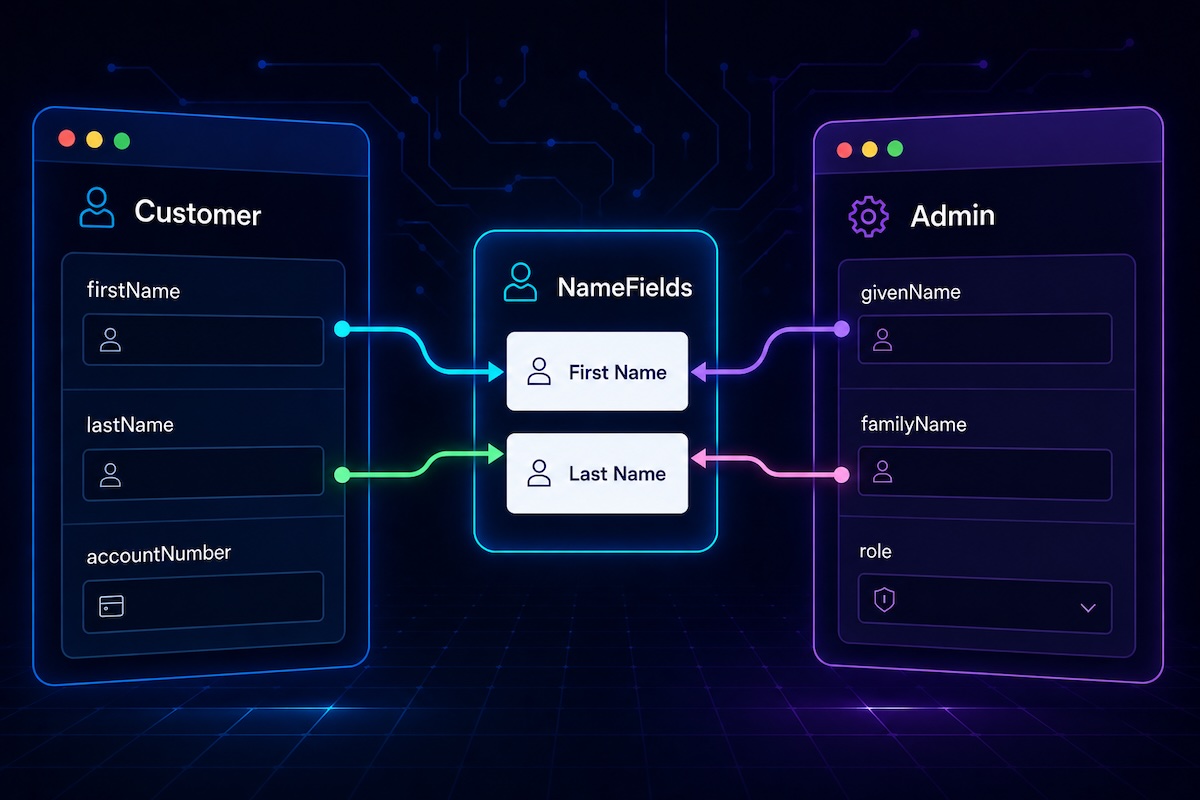
TanStack Form's withFieldGroup higher-order component is a powerful way to extract reusable form sections. The more common use case of pulling out fields for a nested object is well-documented. What's less clear (and was previously undocumented) is that it also works for fields embedded directly in the parent object. The withFieldGroup HOC and the field.* components used throughout this post come from a custom form hook that I previously covered in Building a Reusable Form Component Library with TanStack Form.
The Nested Object Case
The typical withFieldGroup example involves a form data structure that contains a nested object. Take a user form with two phone number fields:
typescriptinterface User {
  name: string;
  homePhone: PhoneNumber;
  workPhone: PhoneNumber;
}

interface PhoneNumber {
  countryCode: number;
  areaCode: number;
  lineNumber: number;
}
Because homePhone and workPhone share the same shape, we can define a single reusable form section:
tsxconst PhoneNumberFields = withFieldGroup<PhoneNumber, unknown, ExtraPhoneNumberProps>({
  render: ({ group }) => (
    <>
      <group.AppField name="countryCode">
        {(field) => <field.NumberField label="Country Code" />}
      </group.AppField>
      <group.AppField name="areaCode">
        {(field) => <field.NumberField label="Area Code" />}
      </group.AppField>
      <group.AppField name="lineNumber">
        {(field) => <field.NumberField label="Number" />}
      </group.AppField>
    </>
  )
);
To render phone number fields for both the homePhone and workPhone properties of our user form, we pass the nested key as the fields prop:
tsx<PhoneNumberFields form={form} fields="homePhone" />
<PhoneNumberFields form={form} fields="workPhone" />
The Flat Object Case
Now consider a different scenario: you have two form data types that share some fields, but those fields aren't nested under a common key:
typescriptinterface Person {
  firstName: string;
  lastName: string;
}

interface Customer extends Person {
  accountNumber: string;
}

interface Admin extends Person {
  role: string;
}
Both Customer and Admin have firstName and lastName, but they're not nested. Instead, they sit at the top level of each object. You might still want a single NameFields component that works in both a customer form and an admin form without duplicating the field definitions.
The withFieldGroup HOC supports this by accepting an object as the fields prop instead of a string. The object maps the sub-form's field names to their corresponding field names in the parent form:
tsxconst NameFields = withFieldGroup<Person, unknown, ExtraPersonProps>({
  render: ({ group }) => (
    <>
      <group.AppField name="firstName">
        {(field) => <field.InputField label="First Name" />}
      </group.AppField>
      <group.AppField name="lastName">
        {(field) => <field.InputField label="Last Name" />}
      </group.AppField>
    </>
  )
});
When rendering this inside a customer or admin form, you pass a mapping object:
tsx// Inside a Customer form
<NameFields
  form={form}
  fields={{ firstName: "firstName", lastName: "lastName" }}
/>

// Inside an Admin form
<NameFields
  form={form}
  fields={{ firstName: "firstName", lastName: "lastName" }}
/>
In this case the mapping is one-to-one since the field names happen to match. But the mapping can also handle cases where the parent form uses different field names:
tsx// If your Admin object defined `givenName` and `familyName` instead
<NameFields
  form={form}
  fields={{ firstName: "givenName", lastName: "familyName" }}
/>
Choosing Between the Two Forms
Use a string (e.g. fields="homePhone") when the shared fields are grouped under a single nested key. Use a mapping object (e.g. fields={{ firstName: "firstName" }}) when the shared fields live directly on the parent object without a common prefix.
Both forms give you the same type safety. The generic parameter on withFieldGroup constrains what field names are valid, and the fields prop is checked against the parent form's data type.